Guide: Bolt
How to let clients edit a Bolt site without giving them Bolt.
Bolt gets a site from idea to live in an afternoon. The week after launch the client wants new prices and a new team photo, and every one of those becomes your job. Here is the handover that keeps the small edits with the client and the real work with you.
The short answer
Bolt handover in short.
Connect the Bolt project to GitHub so the site lives in a repository that you or your client own.
Keep the client out of the Bolt editor: a prompt there changes code, not just words, and only the project owner can manage the GitHub link.
Connect that repository to CMS Chat: the client edits texts, prices and photos by asking, Bolt keeps syncing, and bigger asks come to you as requests.
The handover problem
What actually breaks when you hand over a Bolt site.
Bolt edits code, clients edit words
Every prompt in Bolt can rewrite components. Clients who only want to fix a price should not hold that power, and you should not spend your evenings on one-line changes either.
The GitHub link belongs to one owner
Only the Bolt project owner manages the GitHub integration, and disconnecting it is permanent without Bolt support. Decide before launch which account owns the project and the repository.
Where the site is hosted
A site deployed from Bolt updates when someone deploys again. A host that builds from the GitHub repository on every push (Netlify, Vercel, Cloudflare Pages) makes each client change go out with the next build.
Who pays for what
Your Bolt plan, the hosting, the domain and the client's editing are separate bills. Agree who holds each before handover, so nothing lapses quietly.
Before you hand over
The checklist. Ten minutes now saves the support mail.
- The Bolt project is connected to GitHub and the repository holds the latest version
- You know which account owns the Bolt project and the repository
- The site builds from the repository, ideally on every push to main
- The domain is in the client's name, or the transfer is agreed
- Texts that change often are plain text in components or content files, not inside images
- Environment variables and API keys are documented outside Bolt
Step by step
From Bolt project to a client who edits.
The connect part takes about 3 minutes once the code is on GitHub. Inviting the client and the first change take another ten.
- 01
Connect the Bolt project to GitHub
In Bolt, open the project and connect it to GitHub. Bolt creates a private repository linked to the project (or you import an existing repository), commits changes automatically and pulls changes made outside Bolt about every 30 seconds. Only the project owner can do this.
- 02
Install the CMS Chat GitHub App on that one repository
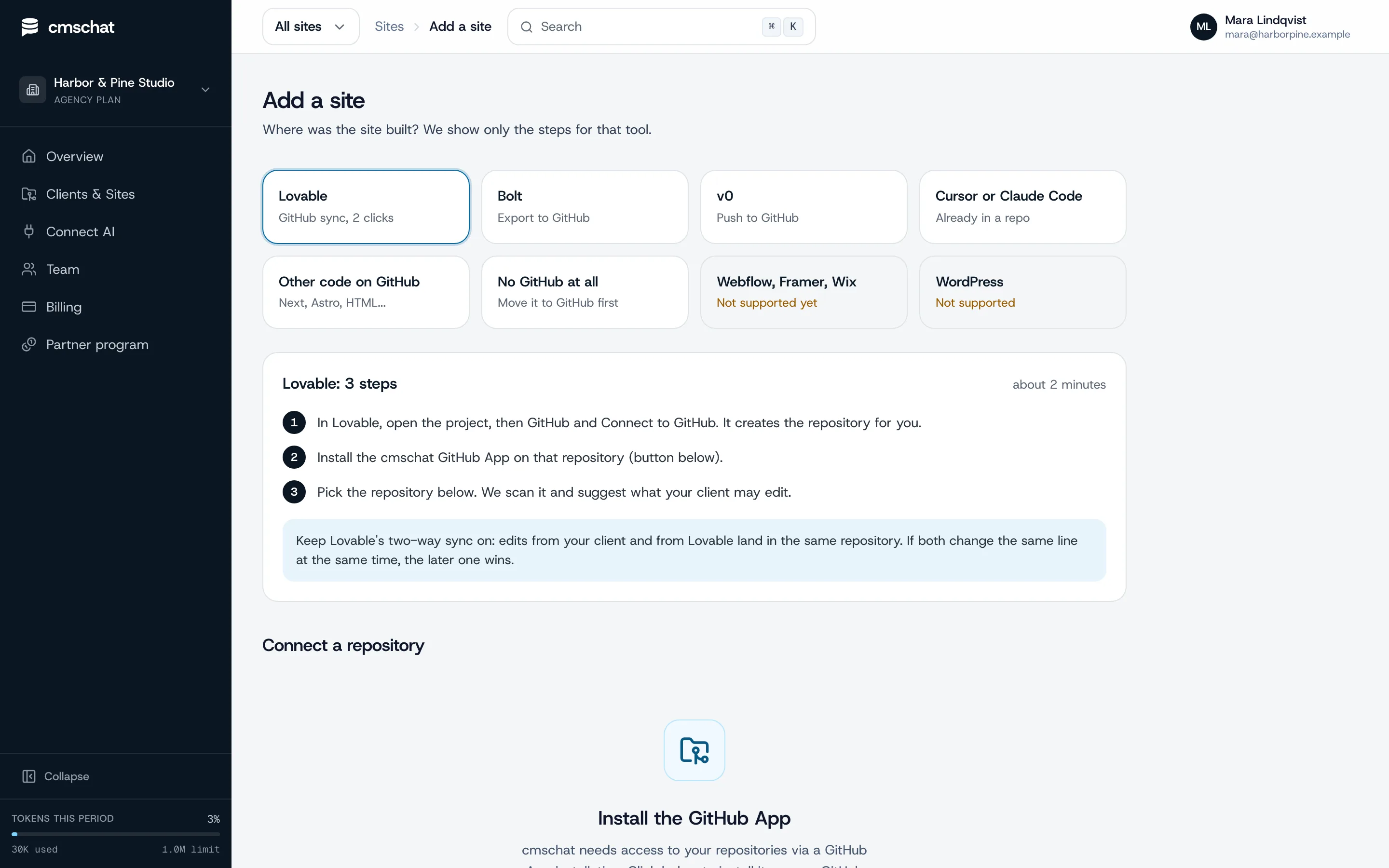
In CMS Chat, open Add a site and pick “Bolt”: you see only the steps for that tool. Then install the GitHub App on the site's repository only. It can read that repository, write to it and open pull requests on it. Nothing else in the account.
- 03
Pick the repository and check what is editable
CMS Chat scans the repository, detects how the site is built and suggests what the client may edit: texts, prices, photos, opening hours. Page titles and headings ask before they change. Layout and code stay locked.
- 04
Invite your client
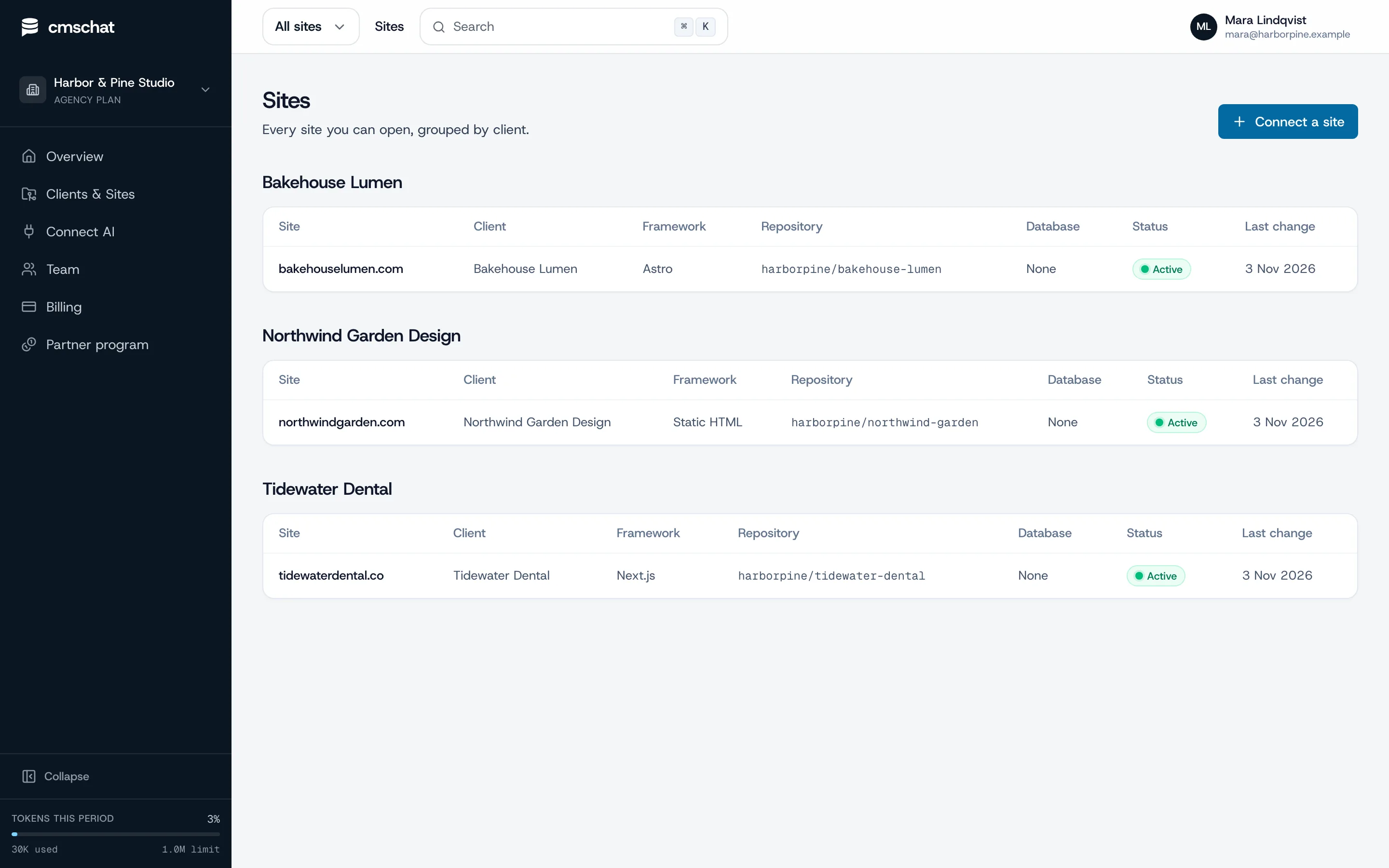
Add the client under Clients and Sites, assign the site and send the invite link. Your client gets a login that shows their site and nothing else: no agency dashboard, no other clients, no settings to break.
- 05
Make the first change together
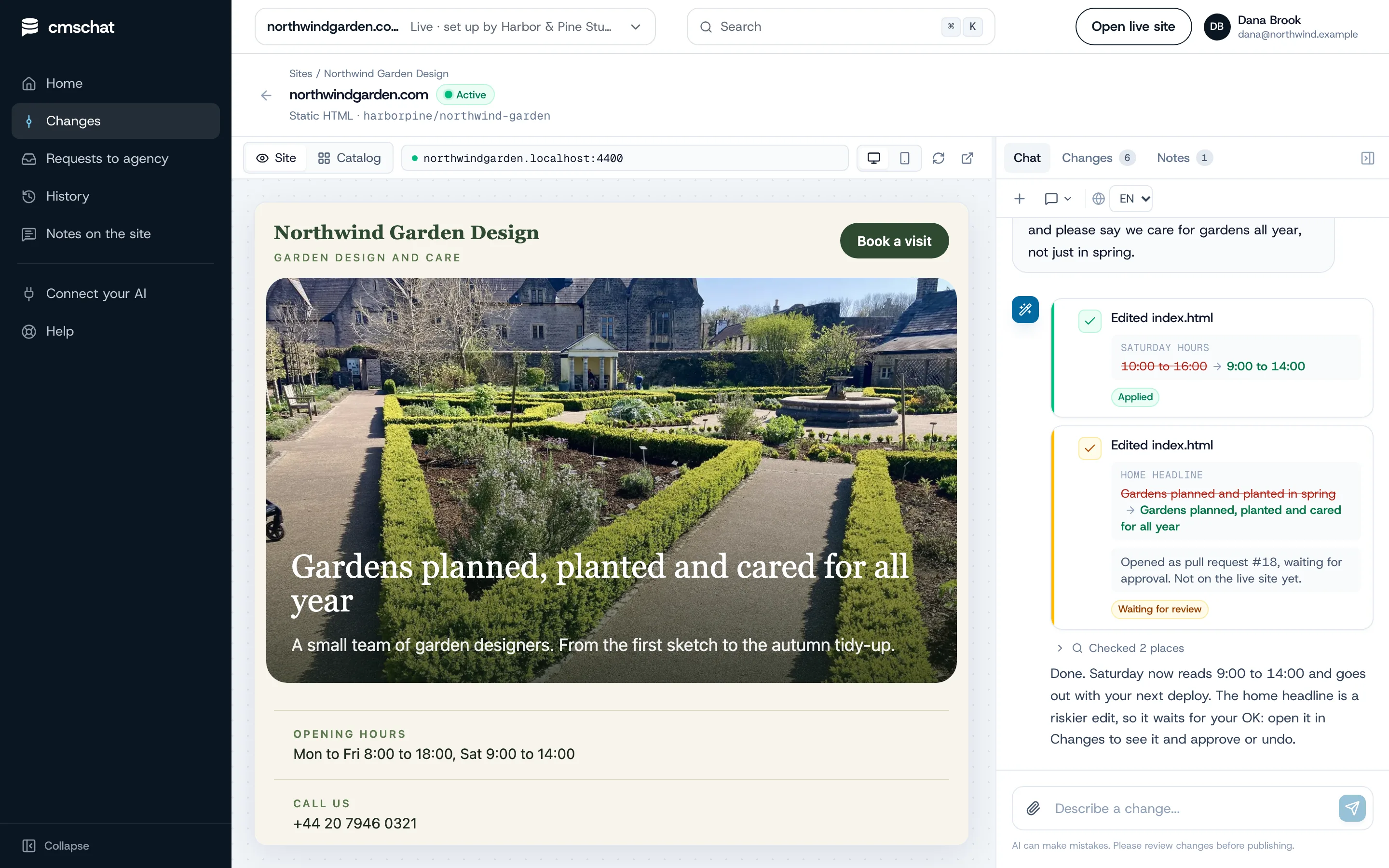
Ask for one small change while your client watches, for example “Saturday we are open 9 to 14”. They see before and after, the change is committed to the repository, and riskier edits wait for an OK.
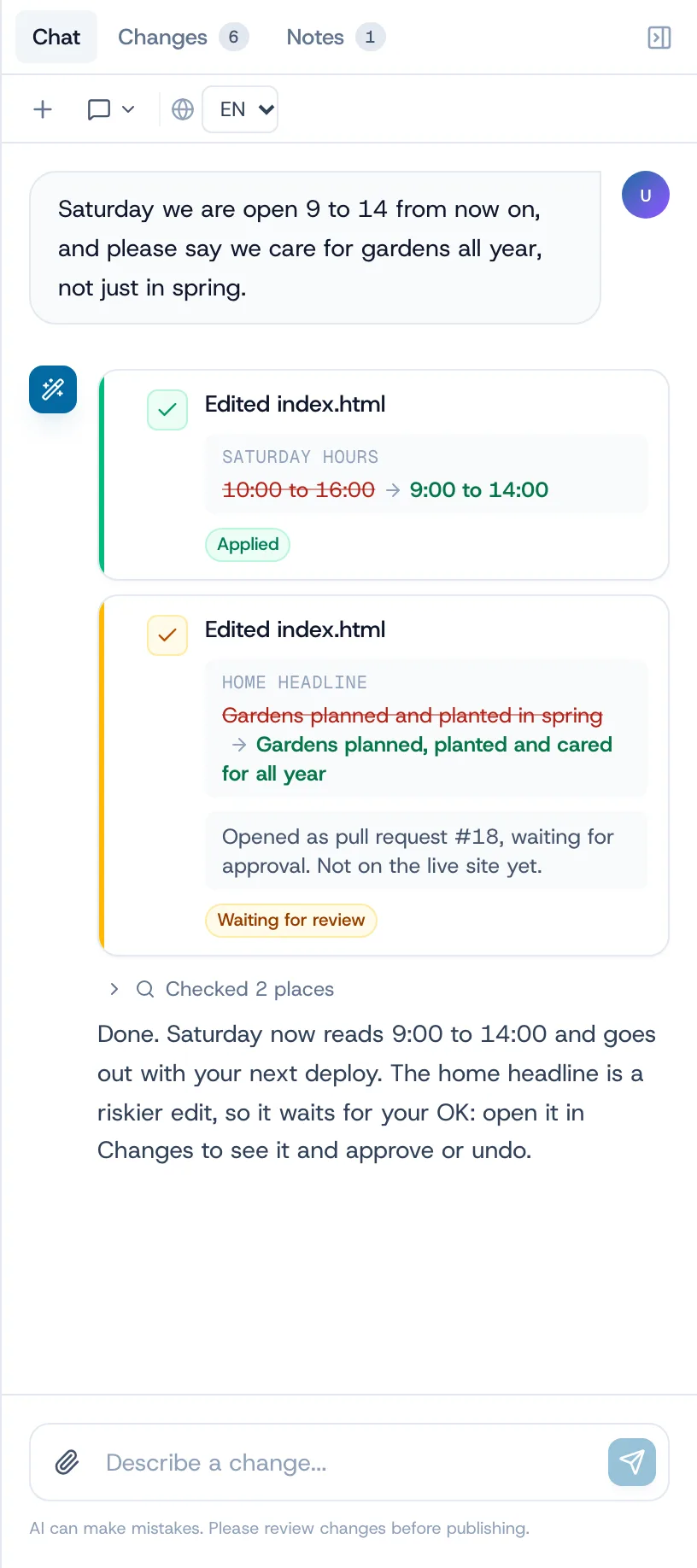
How a change goes live on a Bolt site
CMS Chat commits each change to the repository and Bolt pulls it into the project. If the repository builds on push (Netlify, Vercel, Cloudflare Pages), the change goes live with that build and CMS Chat shows the deploy status. If you deploy from Bolt, it goes live the next time you deploy there.
Small fix or agency job
Where the line sits after the handover.
The client handles the small edits on their own plan. Everything that changes how the site works or looks stays with you, as a request you can quote.
Your client, alone, in a sentence
- Headlines, paragraphs and button texts
- Prices, menus and offers
- Photos and team members
- Opening hours and contact details
- FAQ answers and seasonal banners
Your agency, quoted and built
- A new page or section
- Forms, booking, login, payments
- Layout changes and a redesign
- New features built by prompt in Bolt
- Anything in the code, APIs or database structure
What your client sees
One box to ask. One list to undo.
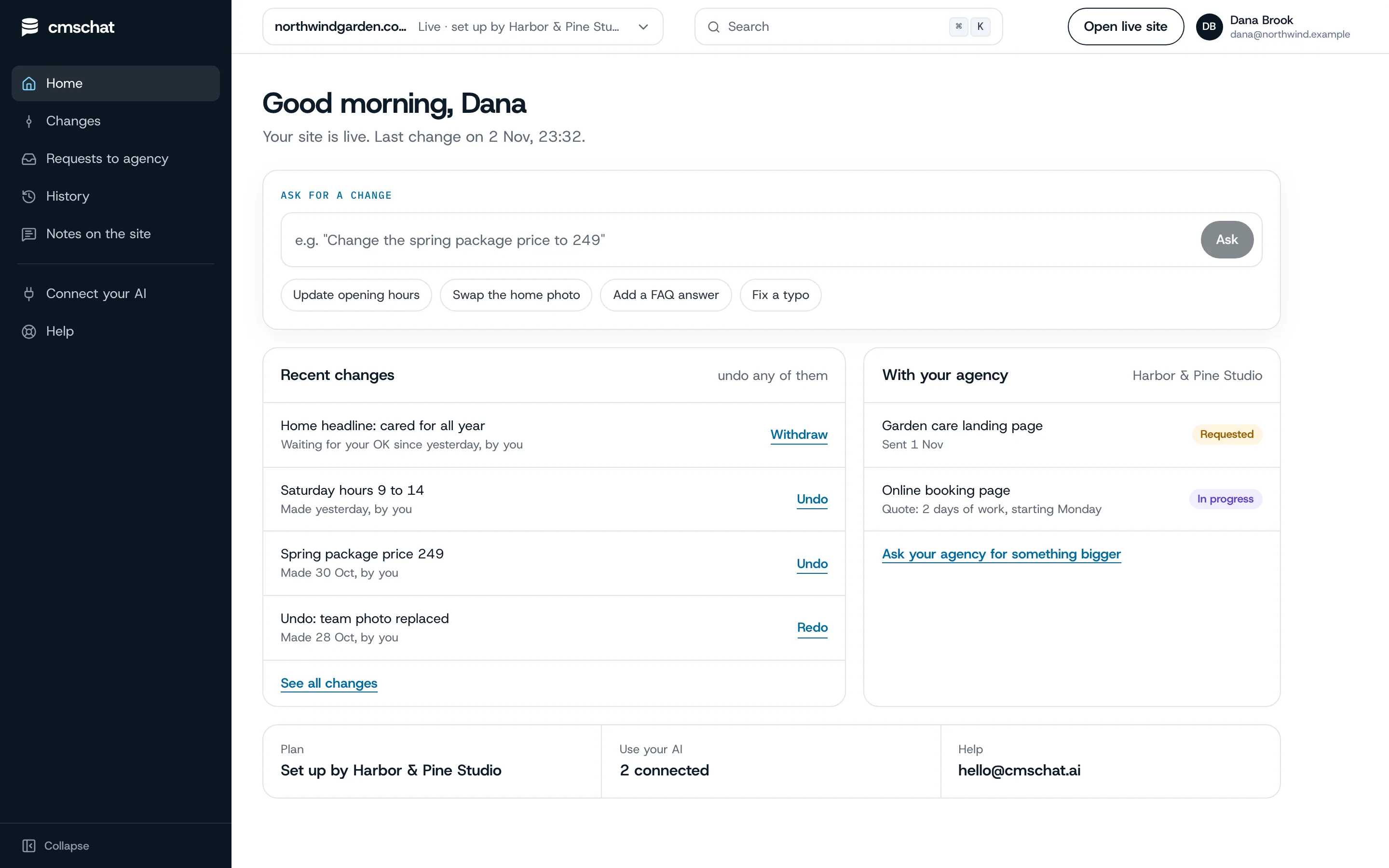
Your client opens their home, types the change, and sees it in their list of recent changes with an undo. Bigger asks go to you from the same screen.
- Their own login, their site only
- Every change in their history, with an undo
- “Ask your agency for something bigger” on the same page
What you see
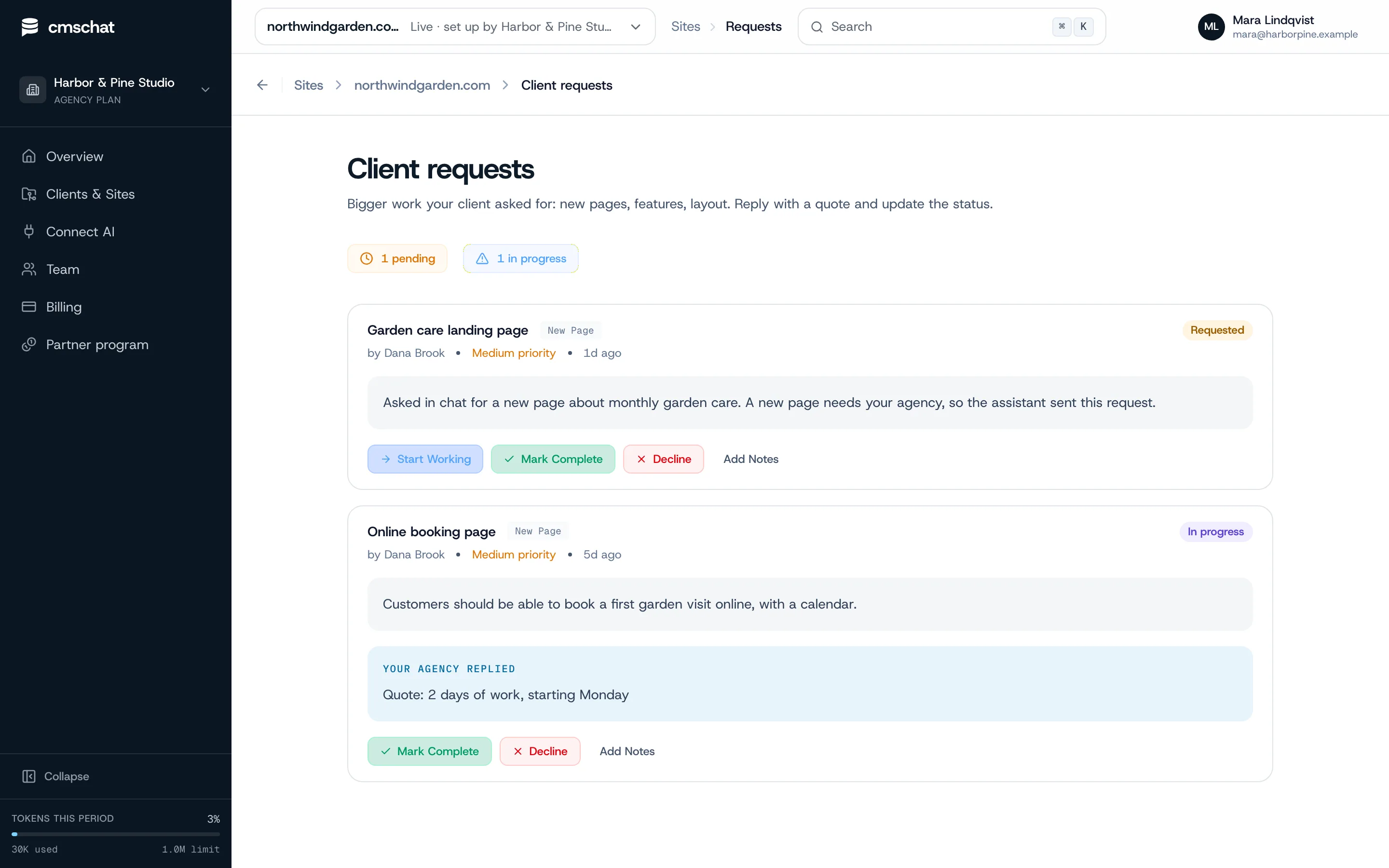
Bigger asks arrive as requests. Ready to quote.
When your client asks for a new page or a booking form, the request lands with you, in their words. You reply with a quote and update the status.
Bolt specifics
What goes wrong and how to avoid it.
Never click Disconnect
Disconnecting a Bolt project from GitHub is permanent: you cannot reconnect it yourself. If the link breaks, reauthorize the GitHub app or contact Bolt support.
Simultaneous edits
If Bolt and GitHub change at nearly the same moment, Bolt keeps its own version. Tell the client when you are building in Bolt, or build on a branch and merge in GitHub.
Branches merge in GitHub
Bolt can create and switch branches but cannot merge them. CMS Chat commits to the default branch, so merge your feature branches in GitHub when they are ready.
Collaborators sync late
Changes by Bolt collaborators sync when the owner next opens the project. Keep the owner account active, or own the project yourself.
Organization repositories
Bolt's personal GitHub connection uses an individual account; organization repositories go through the organization setup. Pick the account before the first sync.
Text in images
Generated hero images often carry the headline. Put headlines in real text before handover so the client can change them.
Who pays for what
Clear money, no awkward invoices.
Your client’s editing
Your client picks a plan from the public price list and pays CMS Chat directly, from EUR 29 / month incl. VAT. Same price with or without an agency.
The AI
Your own ChatGPT or Claude: not metered by us. Built-in assistant: a monthly allowance that resets each month.
Your bigger work
New pages, features and redesigns stay between you and your client, quoted and invoiced by you as before.
Questions
Bolt handover, asked before
Anything missing: write to hello@cmschat.ai and a person replies.
Can my client edit a Bolt site without a Bolt account?
Will Bolt overwrite my client's changes?
Do I need to export the Bolt project?
What can my client change on their own?
Who pays for the client's editing?
Is CMS Chat part of Bolt?
Other builders
Building sites for clients? See how CMS Chat works for agencies.
Hand it over. Keep the big work.
Connect the repository, invite your client, make the first change together.
month to monthundo any changecode stays in your GitHub
Prefer to see it first? Ask for a walkthrough